Your Studio
Your website, and everything behind it.
In one place.
Every site we build comes with its own Studio. It's where you change your words and photos without worrying about breaking the design. And if you want it to, it's where your bookings, enquiries and reminder emails happen too, instead of five different apps.
- 01Comes with every site we build
- 02Change your site from your phone
- 03Built to look like your business, not ours
Two plans
Pick how much you want it to do.
Sites start from £175 to build, including your first year of hosting. After that you choose a plan. Studio Pro includes everything in Studio, so you only ever pay for one.
£99a year
Your website, kept safe and yours to change.
- Change your words, headings, photos, blog posts, opening hours and notices
- Move and add sections on a page, without breaking the design
- Hosting, security and backups
- Your renewal dates in front of you
£39a month
Everything in Studio, plus the business side.
- Everything in Studio
- Clients book and pay on your site, with reminders sent for you
- Classes, class passes and waiting lists
- Deposits, packages, memberships and gift vouchers
- Website enquiries in one inbox
- Automatic emails: confirmations, reminders and follow-ups
- A blog post and a Google check every month, with a short report
- Message us when you want something changed
- Instagram and Facebook messages Coming soon
Bigger jobs, like new features, apps or a custom funnel, are quoted before we start. Nothing is added to your bill without you saying yes.
Try it
Try both. This is the real Studio.
Every site we build comes with its own Studio. Here are both plans, live. This is exactly what you'd log into.
Your website and the whole business side, in one login.
Bookings, your client list, website enquiries, automatic emails, website editing and a monthly report. Instagram and Facebook messages are shown working here and switch on once Meta approves the app. This one is set up as AI ORCA. Press a "Show me" button, or just click around: it's the real thing.
- Bookings move a session, or add one
- Enquiries answer one from your website
- Website open Home and type on the page
Your website, kept safe, and yours to change.
Hosting, security and backups, with your renewal dates in front of you. Edit anything on your site yourself: words, headings, photos, blog posts, team profiles, opening hours and notices. The rest of the menu is part of Studio Pro: you can look, but it isn't switched on.
- Website open a page and edit it
- Photos swap one, or upload your own
- Hosting see when it renews
Same Studio. Built to look like you.
Every Studio is set up in the business's own brand, so it feels like yours from the first login. Four examples, all on Studio Pro. Pick one and have a click around.
Demos with sample data. Nothing you change is saved anywhere or goes live.
What it replaces
Six tools that don't talk to each other. Or one that does.
- A booking tool, paid monthly
- An email marketing tool
- A website builder login
- A spreadsheet of clients
- Reminder texts sent by hand
- Instagram DMs answered one by one
One Studio.
Your website, bookings, client list, messages and automatic emails in one place, plus hosting and the work each month to get you found.
Compare Studio and Studio Pro →Bookings and payments
Clients book on your own site. The rest happens on its own.
No second logo, no sending people off to someone else's page. They pick a session and a time you're actually free, pay if you want them to, and get a confirmation straight away.
- Your session types, lengths and prices
- Only times you're free, checked against your Google Calendar
- Paid through your own Stripe, so the money comes to you
- Confirmation, calendar invite and a reminder at the time you choose, sent for you
- A link to move or cancel, up to the cut-off you set
- New clients get in touch first, or sessions taken by request, if that's how you work
- Pay when they book or before the session, a deposit or monthly payments, plus packages and gift vouchers
- Times shown in your client's own time zone, and online sessions with your video link
Bookings and payments
I already use Calendly, Acuity, Setmore or Fresha. Can I move?
Yes, and we do the moving. Your client list and upcoming bookings come across wherever the old tool lets you export them, and most do. We switch you over near your renewal date so you're not paying twice, and you test a booking on your own phone before anything changes.
Does it work with my calendar?
It checks your Google Calendar so people can only book when you're actually free, and new bookings land in it. Use Outlook or Apple Calendar? Your bookings show there too, through a private calendar link. The free-time check itself works with Google Calendar.
How do clients pay?
Through your own Stripe account, so the money goes straight to you and card details never touch us. Stripe charges its own small card fee. Take it all when they book, before the session, as a deposit or as monthly payments. If you take cash or bank transfer instead, mark it as paid in a tap.
Can clients move or cancel themselves?
Yes, from a link in their confirmation email, up to the cut-off you set. You get told either way.
Video calls?
Each booking can be video, phone or in person. If you use Google Workspace a Meet link is made for every booking. Otherwise we add your usual room link.
Can I check new clients before they book?
Yes. Set a session to "new clients get in touch first" and someone new sends you a short message instead. Press Approve and they get a link to book. Anyone you've already seen books as normal.
Classes and group sessions?
Yes. Your timetable sits on your own site and people book a place and pay there. Each class has a set number of places, a full class runs a waiting list, and you can sell class passes. It's part of Studio Pro.
Enquiries and messages
Every message in one place, answered faster.
Website enquiries, Instagram and Facebook messages and comments land in the Studio, with how long you've got left to reply. Set a keyword once and the right link goes out on its own.
- Every website enquiry, with an instant automatic reply
- Instagram and Facebook messages and comments together (coming soon)
- Keyword replies: comment GUIDE, get the guide
- Know which conversations turned into bookings
Instagram and Facebook (coming soon)
When can I use it?
It's built and works as shown in the demo. It switches on for clients once Meta approves the AI ORCA Studio app, which is under way now. Studio Pro clients get it the day it's approved, at no extra cost.
Which accounts work?
An Instagram professional account (business or creator) linked to a Facebook Page. That's Meta's rule for any messaging tool. If yours is a personal account, switching takes two minutes and we'll walk you through it.
Will it reply on its own?
Only where you've told it to, with your own wording: for example, someone comments GUIDE and gets your guide in their messages. Everything else waits for you. Every automatic message is labelled, so you always know which was you.
Automatic emails
The emails you mean to send, sent every time.
Written once with you, in your voice and your colours. After that they go out at the right moment with the right details in them. You can read every one before it's switched on.
- Booking confirmed, with the calendar invite
- A reminder at the time you choose, from 2 hours to 3 days before
- Moved or cancelled, with a way to rebook
- A follow-up after the session, with a review ask
- To you: new-booking alerts and tomorrow's list the night before
Do I have to move my email to you?
No. Your inbox stays exactly where it is: Gmail, Outlook, iCloud, your web host, anywhere. We never touch it. The Studio just sends you alerts and your clients' replies land where they always do.
Will the automatic emails come from my address?
Two ways. The simple one: they go out with your name on them, and every reply comes straight to your own inbox. Nothing to set up. Or from your own domain (you@yourbusiness.co.uk): that needs three small settings added where your domain is kept, and we add them for you if you give us access.
I use a Gmail or Hotmail address. Is that a problem?
Not for anything you'll notice. Gmail, Hotmail and iCloud addresses can't be the sender on automatic emails (that's their rule, to stop spam), so yours go out under your business name with replies coming back to your Gmail. If you'd like a proper you@yourbusiness.co.uk address, we'll help you set one up.
Can I send newsletters?
Not from the Studio yet. Keep using the tool you have (Mailchimp, for example) and we'll connect your site's sign-ups to it. Sending from the Studio is planned, and we'll say clearly when it's ready.
Your website
Change anything on your site, from your phone.
Open a page and type on it. Swap a photo from your library or upload a new one. Press Publish and it's live. The design stays locked, so nothing you do can break the layout.
- Words, headings and photos on every page
- Blog posts, team profiles, opening hours and notices
- Preview on a phone before you publish
- On Studio Pro: or just message us the change
Your website
What can I change myself?
Anything on your site: words, headings, photos, blog posts, team profiles, opening hours and notices. You get your login the day the site goes live. The design itself stays locked, so nothing you do can break the layout.
Can I do it from my phone?
Yes. The Studio works on a phone, and you can add it to your home screen like an app.
What if I'd rather not?
On Studio Pro, send us a message with the change and it's done, usually the same or next working day. On Studio, a new page or feature is from £50, quoted first.
What do you actually do each month on Studio Pro?
We check the searches that matter where you are, improve the pages that should be climbing, write a new blog post aimed at what your clients search for, check your Google listing matches your site, and write it all up in a plain-English report in your Studio. We work to improve where you show up; nobody can honestly promise a position on Google.
Your clients and your data
One list of everyone, and it's yours.
Everyone who has booked or got in touch, with your notes and their history, searchable in one place. Bring your contacts in from anywhere, and take them with you whenever you like.
- Notes after every session
- Where each client came from
- Import from any tool that exports a spreadsheet
- Export everything, any time
Your clients and your data
Can I bring my contacts over?
Yes. Anything that exports to a spreadsheet comes across: your old booking tool, Mailchimp, GoHighLevel, a phone export or a spreadsheet you keep yourself. We do the import.
Who owns the data?
You do. Export your clients, bookings and mailing list to a spreadsheet whenever you like. If you ever leave, you take it with you.
Is it secure?
Every business has its own locked-off space, so no client can ever see another's data. You sign in with your email and a code, everything is encrypted in transit, and that separation is tested, not assumed.
What about GDPR?
Your booking page carries a privacy notice, people can ask for their data to be deleted, and we set up a data processing agreement with you as part of onboarding, because you're the one collecting the data and we're looking after it for you.
What you're paying for
You can see the work. All of it.
The usual trouble with a monthly plan is that the work is invisible, so you start to wonder. Here every job is written down the day it's done, and once a month it's summed up on one page.
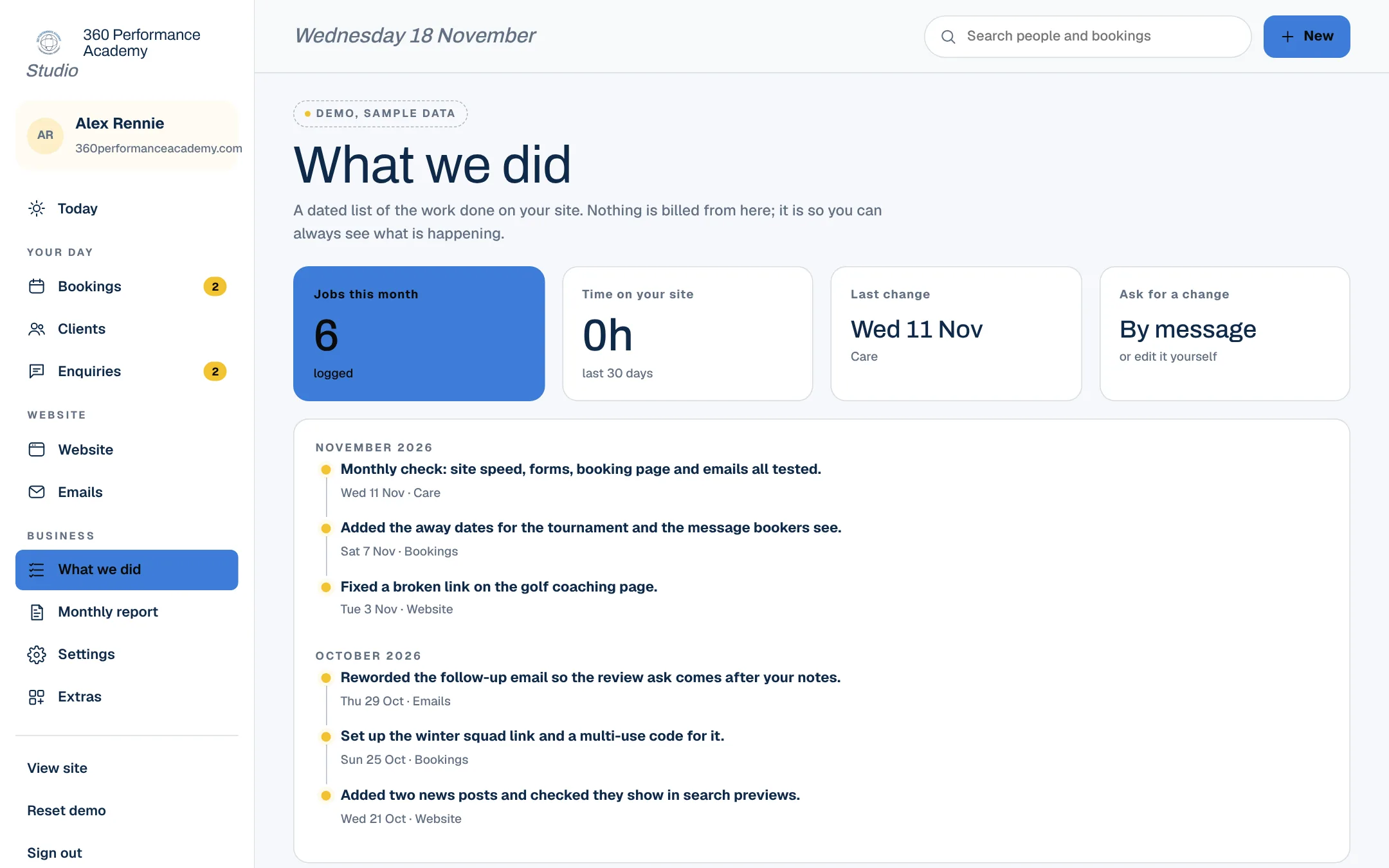
Demo · what we did
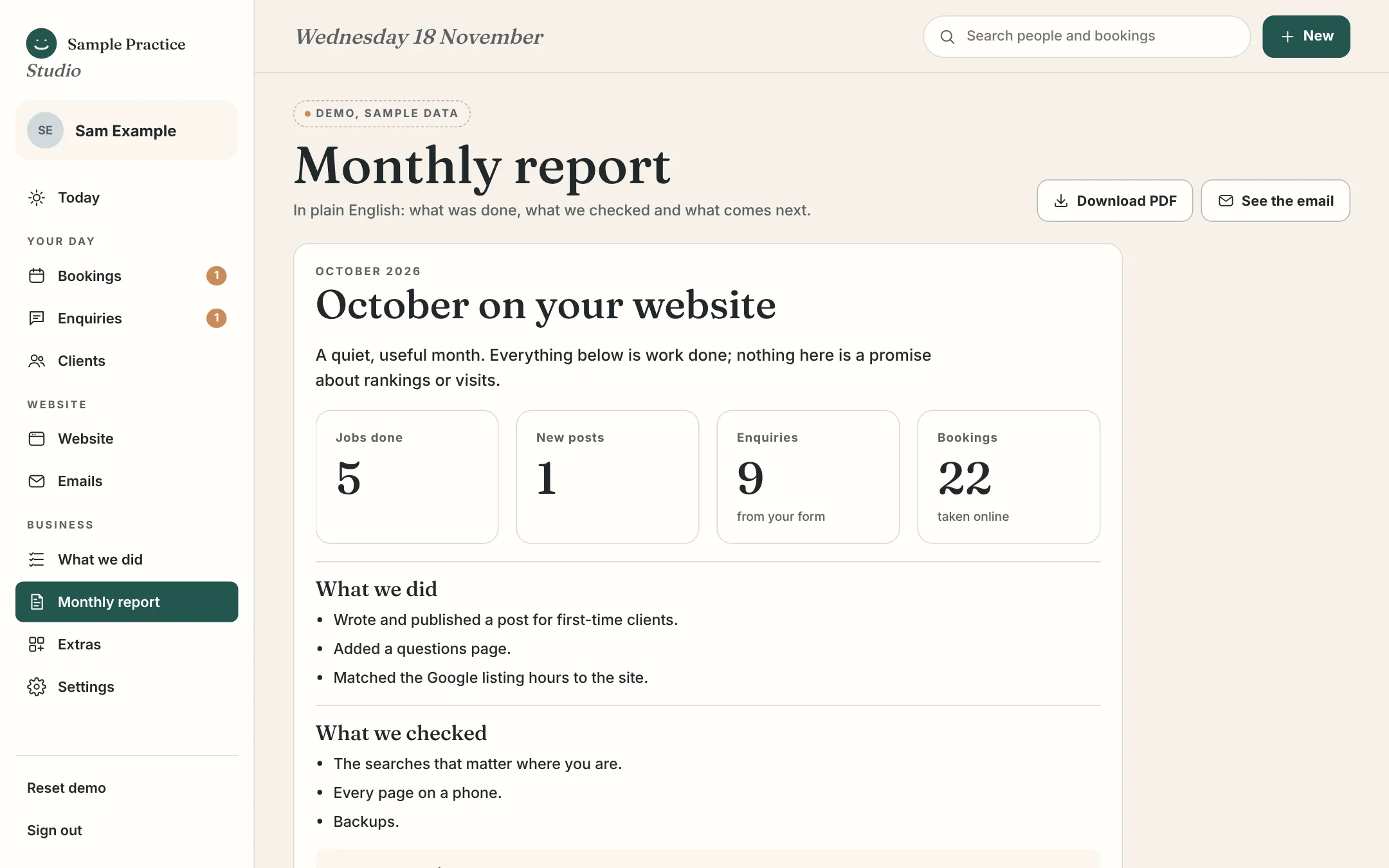
Demo · the monthly report
Moving over
Already using a booking tool? We move you.
The reason most people stay on a tool they've outgrown is the thought of moving. So we do that part.
- 01
Copy
We bring your client list and your booking history across from the tool you use now, where it lets you export them.
- 02
Set up
Your session types, hours, colours and emails go in. You read every email before any of them is switched on. A short set-up list in your Studio shows what's left, and nothing paid goes live until payments are connected.
- 03
Check
You make a test booking on your own phone and watch it arrive. We change whatever isn't right.
- 04
Switch
The booking button on your site points at the new page. You cancel the old subscription when you're ready.
Who does what
You run the day-to-day. We do the rest.
The Studio is built so you never wait on us for the small things, and never have to touch the technical ones.
You, whenever you like
- Change words, photos, blog posts, team profiles, hours and notices
- Take, move and cancel bookings and classes; set your hours and time off; approve new clients
- Change the wording and timing of your automatic emails
- Reply to enquiries (Instagram and Facebook messages coming soon)
- Add notes to clients, and export your data any time
Us, as part of the plan
- Hosting, security, backups and anything that breaks
- Setting up your Studio in your brand, and moving you over
- Calendar and email sending connected for you, and Stripe set up with you (it's your own account, so you sign in to it once)
- On Studio Pro: changes by message, new pages, the monthly search work, a blog post, your report, and ready-made funnels (a free-guide sign-up, or event and retreat tickets)
Quoted first
- A new kind of feature, or a big layout change
- Custom funnels, apps, chat assistants and custom automation
- A new page on Studio (from £50)
Questions
Moving in, moving on.
The things people ask before they commit to anything monthly.
Moving in, moving on
Is this an all-in-one system?
For the business side of a service business, yes: your website, bookings, payments, clients, enquiries, messages, emails and reporting in one login. It isn't accounting software, a till or a stock system, and it isn't a build-anything workflow tool. If you need one of those, we'll tell you, and connect it where we can.
What happens if I stop Studio Pro?
Your site stays live on Studio at £99 a year. The business side switches off, and your client list, bookings and mailing list export to a spreadsheet first.
What if I leave altogether?
Your domain is in your name, the site is yours, and your data comes with you. No lock-in, no exit fee.
The demo
Is that my data in the demo?
No. Every name, booking and message in the demos is invented, and nothing you do in them is sent or stored anywhere but your own browser.
Do my clients need an account or an app?
No. They book on your website like any other page, and everything they need arrives by email.
See yours first
We'll build a few of your pages, free. Then decide.
Send us your site, or just your Instagram, and we'll rebuild a few of your pages properly and send them over as a link. If you take bookings, say what you use now and we'll show you how it would look on your own site.